Solana RPC Node Setup & Best Practices: A Complete Guide with NoLimitNodes
Every Solana application, from a weekend dApp to a service handling thousands of users per second, talks to the chain through the same kind of gateway: an RPC node.
Every Solana application, from a weekend dApp to a service handling thousands of users per second, talks to the chain through the same kind of gateway: an RPC node. This guide explains what RPC nodes do, how to call one, what it takes to run your own, and when a managed provider is the better trade.
We'll go from "what even is an RPC node?" to a working deployment, including hardware specs and cloud options. And if you'd rather skip the ops work entirely, we'll show how NoLimitNodes gets you a production endpoint without any of it.
What is a Solana RPC Node?
An RPC (Remote Procedure Call) node lets you read blockchain data, submit transactions, and interact with smart contracts on Solana. It's the interface between your application and the network: your code sends JSON-RPC requests, the node answers with chain state.
How to Use a Solana RPC Node
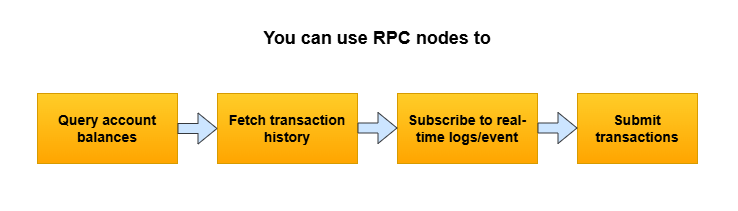
Example using curl:
curl -X POST 'https://api.nolimitnodes.com/solana?api_key=YOUR_API_KEY' \
 -H 'Content-Type: application/json' \
 -d '{"jsonrpc":"2.0","id":1,"method":"getEpochInfo"}'
Subscribe via WebSocket using Python:
import asyncio, websockets, json
async def connect():
async with websockets.connect('wss://api.nolimitnodes.com/solana?api_key=YOUR_API_KEY') as ws:
await ws.send(json.dumps({
"jsonrpc": "2.0",
"id": 1,
"method": "logsSubscribe",
"params": [{"mentions": ["YourAccountAddress"]}, {"commitment": "finalized"}]
}))
while True:
print(await ws.recv())

asyncio.run(connect())
How to Set Up a Solana RPC Node
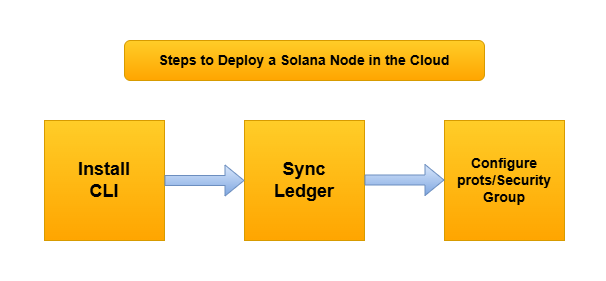
To run your own node:
- Install the Solana CLI: sh -c "$(curl -sSfL https://release.solana.com/stable/install)"
- Download the ledger: solana-ledger-tool
- Run the node:
solana-validator \
 --entrypoint entrypoint.mainnet-beta.solana.com:8001 \
 --rpc-port 8899 \
 --ledger /your/ledger/path \
 --enable-rpc-transaction-history \
 --log /your/log/file.log
Minimum Hardware Requirements for Solana RPC Node
For personal or light use (500–1000 RPC calls/min), plan on:
- Bandwidth: 100 Mbps (1 Gbps preferred)
- Storage: 2TB NVMe SSD
- RAM: 128 GB
- CPU: 16-core (modern AMD/Intel)
To enable historical transaction info, your requirements increase:
- Connection: 1 Gbps+
- Storage: 4TB+ NVMe
- RAM: 256 GB+
How to Deploy a Solana Node in the Cloud
If you'd rather not manage bare metal, these cloud options can meet the specs above:
- Hetzner (AX101 or similar)
- Google Cloud (n2-highmem-16 + local SSDs)
- AWS EC2 (i3.4xlarge or higher)
Why Use NoLimitNodes for Solana RPC Access?
NoLimitNodes offers:
- Capacity that fits small scripts and full-scale dApps alike
- Developer-friendly SDKs and documentation
- Reliable access via Solana RPC URL and WebSockets

Easy setup with API keys
- REST API:
https://api.nolimitnodes.com/solana?api_key=xxx - WebSocket:
wss://api.nolimitnodes.com/solana?api_key=xxx
What are the benefits of using a global RPC node network?
- Lower latency: requests are routed to the nearest server.
- High availability: regional failovers improve reliability.
- Scalability: distributed infrastructure absorbs high throughput.
- Load balancing: traffic is spread out so no single node becomes a bottleneck.
How does a Solana RPC node handle transaction processing?
A transaction moves through an RPC node in seven steps:
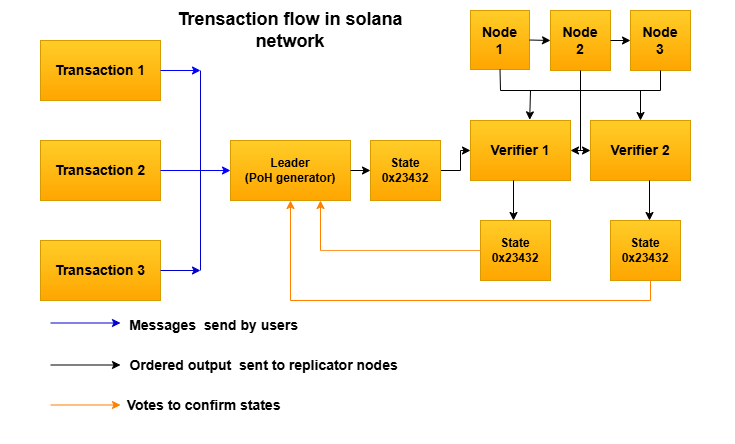
- Receive Transaction: via the JSON-RPC API (e.g. sendTransaction).
- Verify Signature: confirms the sender authorized it.
- Simulate Transaction (Optional): catches issues like insufficient balance before submission.
- Submit to Cluster: forwards the transaction to the Solana network.
- Inclusion in Block: a validator adds it to a block using Proof of History (PoH).
- Confirmation: the network finalizes the block, usually within seconds.
- Return Result: the node sends success or failure plus the signature back to the client.
What tooling exists to monitor the performance of RPC nodes?
- Solana Metrics Dashboard (via Grafana + Prometheus)
- Solana's Built-in Logs: solana-validator outputs system and RPC logs.
- Third-party monitoring tools:
- Grafana + Loki for log aggregation
- Telegraf + InfluxDB for resource metrics
- Nodewatch or Solana Beach for validator/node monitoring
Wrapping Up: The Smart Way to Build on Solana
However you build on Solana, RPC access sits at the core of it. Running your own node is a solid learning exercise, but it comes with real hardware costs, long sync times, and ongoing maintenance. For most developers who want to ship, a managed service is the practical choice.
With NoLimitNodes you get instant access to a high-performance Solana RPC API and Solana RPC URL with no setup work. Plug in the endpoint and start building.
Every benchmark in this blog runs against our public endpoints.
Spin up an RPC, WebSocket, or gRPC endpoint in under a minute. Flat pricing, no request caps. Reproduce the numbers for your own workload.